Reader question
What is the best CRM automation for B2B sales follow-up?
The CRM should stop being a manual archive. A real revenue system detects what changed, drafts the next step, logs the context, and keeps deals moving.
CRM Is Where Deals Go to Be Remembered. Gwenth Is Where They Move.
A CRM that only stores history is not enough. Modern revenue teams need automatic next actions, follow-ups, and relationship memory.
Scroll horizontally to inspect the diagram.
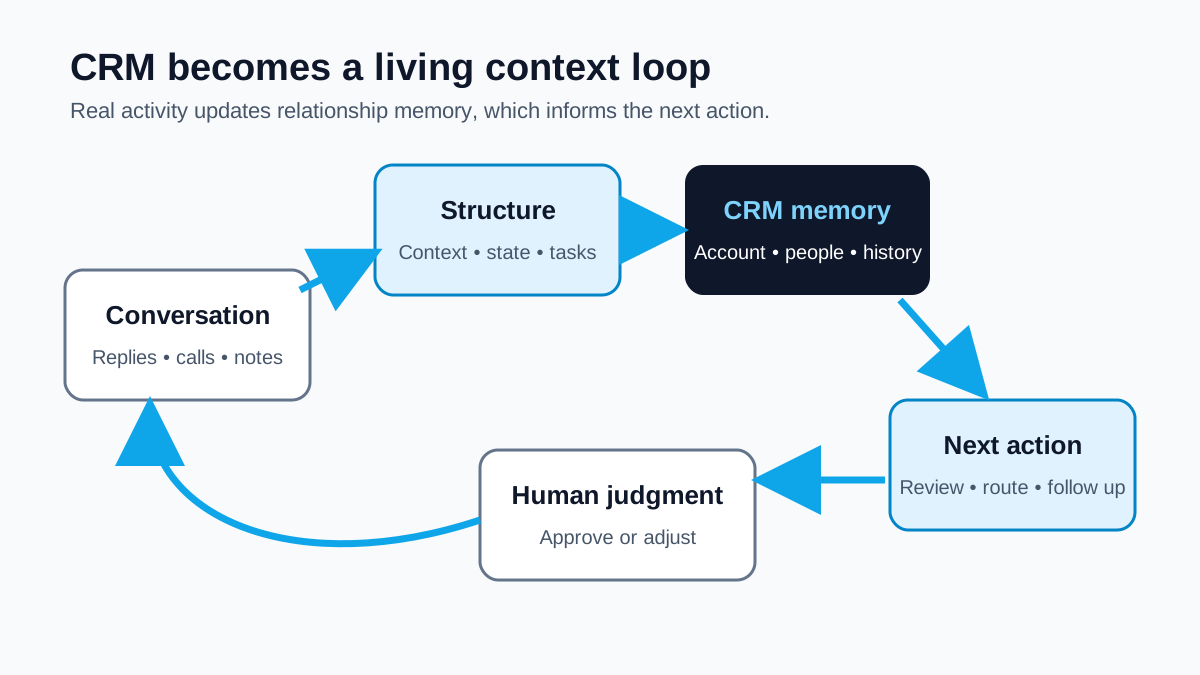
A CRM is not a revenue engine. It is a system of record. That matters, but a record does not answer the buyer’s question, send the promised document, prepare the next meeting, or remind the founder that an account is waiting. Deals move because people complete the right actions with the right context.
“The CRM should update itself” is therefore not an argument for letting software rewrite the truth. It is an argument against duplicate clerical work. When a reply, meeting, or account review already produced structured evidence, the workflow should help turn that evidence into a timely record and a proposed next action—with review wherever the inference could be wrong.
Short answer
The best CRM automation for a lean B2B team connects communication and meeting context to account records, suggests structured updates, drafts appropriate follow-ups, tracks open commitments, and surfaces the next action. It should preserve source and uncertainty, require review for material changes, and respect permissions. The goal is not a fully autonomous CRM; it is a more complete, timely, and useful relationship memory.
System of record and execution layer
A system of record stores durable entities and history: accounts, contacts, ownership, activities, stages, notes, and tasks. Microsoft’s documentation for Dynamics 365 activity timelines, for example, describes emails, appointments, phone calls, notes, and tasks associated with a record. This is a familiar CRM pattern.
An execution layer interprets what just happened and helps the team choose what to do next. It can bring the last reply beside the account record, identify an unanswered question, prepare a meeting brief, draft a recap, or suggest that an obsolete task be closed. The two layers should cooperate: execution feeds reviewed context into the record, and the record prevents future execution from forgetting the relationship.
What “updates itself” should mean
- Capture the event once. Ingest or record the reply, meeting note, approved message, account observation, or human decision through the connected workflow. Avoid asking someone to paste the same text into multiple fields.
- Attach it to the right entities. Resolve the account, contact, conversation, meeting, and owner. If identity is uncertain, route it for review instead of guessing.
- Separate observation from interpretation. “Buyer asked for security documentation” is an observation. “Deal moved to technical validation” is a workflow interpretation that may require approval.
- Propose the smallest structured update. Add a note, update relationship state, create a task, record a preference, or suggest a stage change only when the evidence supports it. Preserve the source and timestamp.
- Create one owned next action. Name what should happen, who owns it, and when it is due. “Follow up” is not specific enough; “send requested security overview by Thursday” is.
- Reconcile after the action. When the resource is sent, the buyer replies, or the meeting occurs, close or revise the task and update the relationship state. Do not leave contradictory open work behind.
Quality matters more than field coverage
Teams often measure CRM quality by whether required fields are populated. That can reward confident nonsense. The UK Government’s Data Quality Framework distinguishes completeness from accuracy and also discusses timeliness, validity, consistency, and relevance. Those distinctions map cleanly to CRM operations.
- Complete: the important relationship events and commitments are present.
- Timely: the record changes soon enough to guide the next interaction.
- Accurate: confirmed facts are not mixed with unverified inference.
- Consistent: the inbox, meeting context, task state, and account record do not contradict one another.
- Relevant: the record preserves information that helps a person understand or act, rather than every available scrap.
A self-updating workflow should optimize that whole set, not maximize the number of fields it touches. An empty stage is sometimes safer than a wrong stage. A concise note with a source can be more useful than a long generated summary.
An illustrative record change
Imagine a fictional founder who meets a prospect after an email exchange. During the call, the prospect asks for a data-processing overview and says procurement review would come before any trial. A useful workflow attaches the meeting context to the correct account, drafts a factual recap, and proposes a task: “Founder to send data-processing overview by Friday.” It may suggest updating the relationship state to “procurement questions,” but the founder reviews that interpretation.
When the buyer replies, the unified context closes the delivery task and records the new question. It does not declare the deal qualified, forecast a close date, or claim intent. If the buyer later says the project is paused, the CRM should preserve that fact and stop inappropriate follow-ups. The workflow becomes valuable because future activity begins from the truth, not because many fields changed automatically.
Common automation mistakes
- Automatic stage inflation: treating a reply or meeting as proof of qualification.
- Summary without provenance: storing a polished paragraph that no reviewer can trace to messages or notes.
- Task multiplication: creating a new reminder for every event without closing obsolete work.
- Preference loss: failing to carry an opt-out, channel constraint, or “not now” response into future workflows.
- Silent overwrites: replacing a human correction with a later automated inference.
How Gwenth applies this
Gwenth can connect available account and signal context, email/LinkedIn/WhatsApp workflow context, unified inbox replies, meeting context, and next-action support to CRM/account records. Depending on connected sources and user configuration, that can reduce duplicate logging and keep the evidence for an action near the record it affects.
The intended pattern is assistive: surface a reply, prepare a draft, preserve a meeting promise, suggest an update, and give the human owner a clear next action. Teams remain responsible for identity resolution, review rules, field definitions, permissions, and corrections. Gwenth does not guarantee complete data, correct inference, consent, delivery, or an autonomous outcome.
Read next: compare this operating view with how AI CRM differs from traditional CRM, then see why event leads are not leads until the follow-up happens.
Tags
References
Source material used for factual context in this article.
- The Government Data Quality Framework
UK Government · Accessed
Supports treating completeness, timeliness, consistency, validity, and accuracy as distinct qualities rather than assuming more CRM data is better data.
- Track Activities in Timeline
Microsoft Learn · Accessed
Supports the baseline CRM pattern of associating emails, appointments, calls, notes, and tasks with a durable account or contact record.