Reader question
What is the difference between AI CRM and traditional CRM?
Traditional CRM is built around account records and activity history. AI CRM should add an execution layer that interprets signals, drafts next steps, and updates relationship memory from real sales work.
How AI CRM Differs From Traditional CRM
Traditional CRM records what happened. AI CRM should understand what changed, propose the next action, and keep relationship memory alive without manual admin.
Scroll horizontally to inspect the diagram.
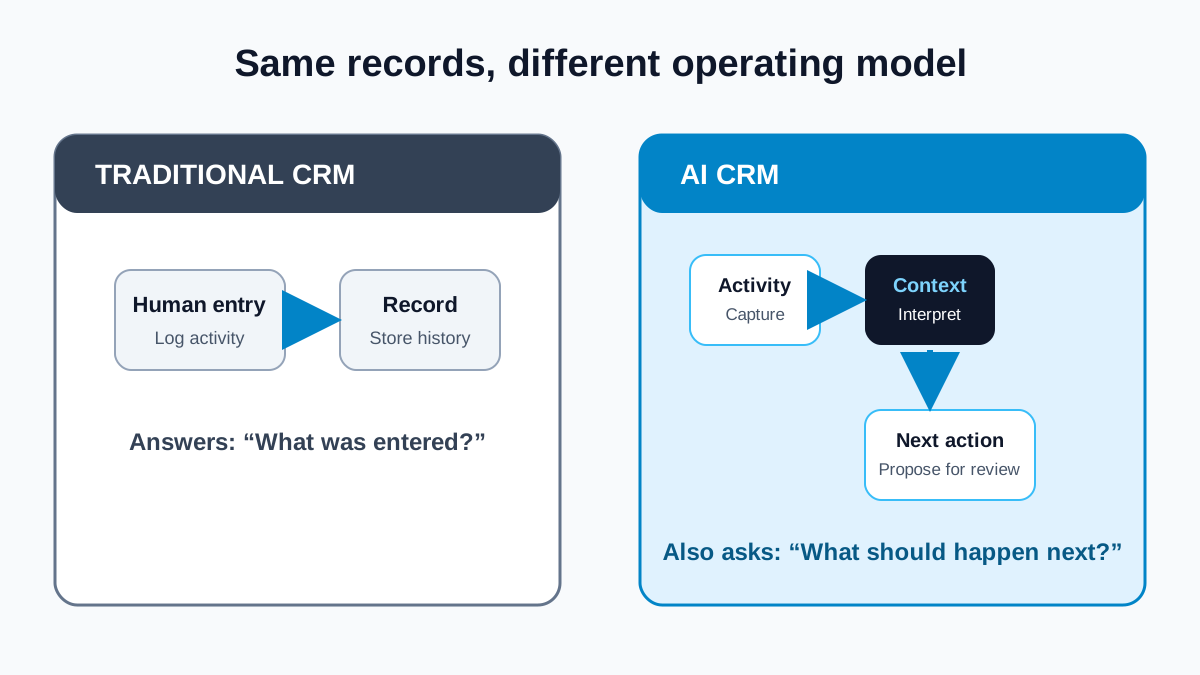
Traditional CRM remembers the relationship. AI CRM should help a team decide how to move it responsibly. A traditional customer relationship management system gives teams a durable place to store accounts, contacts, tasks, deals, and communication history. An AI CRM adds assistance around that record: interpreting available context, drafting a next step, surfacing missing information, and helping keep the record current. The distinction is not “database versus magic.” It is system of record versus system of record plus a reviewable execution layer.
Short answer
AI CRM differs from traditional CRM by adding an execution layer on top of customer records. Traditional CRM manages contacts, deals, tasks, and interaction history. AI CRM can help organize meetings, replies, buying signals, and account context into draft follow-ups, suggested updates, and possible next actions. It should preserve provenance and keep people responsible for verifying evidence, approving important actions, and correcting the record.
What traditional CRM is designed to do
A conventional CRM is primarily a shared relationship database and workflow system. Salesforce’s overview defines CRM around managing an organization’s interactions with customers and prospects. In practice, that means identity, ownership, stage, tasks, notes, activities, and reporting. Those functions remain essential. A sales team still needs to know who owns an account, which contact replied, what was promised, and whether a deal is open, closed, or disqualified.
The limitation is operational rather than conceptual. Records are only useful when they are current and interpretable. A seller can finish a call, send a follow-up, receive an objection, and switch priorities before updating the CRM. The next person then sees an old stage and a thin note. Traditional automation can create reminders or copy fields, but the team still has to translate unstructured work into relationship memory.
The record is not the motion
A record can say who the buyer is, when the last activity occurred, and which stage someone selected. The sales motion is more specific: the question a buyer asked, the objection that remains unresolved, the stakeholder who should join, the resource promised for Friday, and the evidence that changed account priority. AI assistance is most useful when it helps connect those facts without pretending that an inference is a fact.
That distinction creates three layers. The record layer stores durable entities and history. The context layer connects available signals, conversations, people, sources, and timestamps. The action layer proposes a bounded next step such as reviewing an account, preparing questions, drafting a recap, or creating a task. A credible AI CRM keeps the layers visible. It does not overwrite an uncertain observation with a confident conclusion.
A practical AI CRM workflow
- Collect available context. Bring together the account record, recent activities, relationship history, user-approved notes, and attributable external evidence.
- Separate evidence from interpretation. Record what the source actually says, then label the team’s hypothesis about why it may matter.
- Identify the decision. Ask whether the user needs to research, draft, follow up, prepare, monitor, update, or disqualify.
- Generate a reviewable suggestion. Show the source context beside a proposed note, field change, question, or next action.
- Require appropriate human judgment. A seller confirms the meaning, edits the message, checks permissions, and chooses whether to act.
- Write back the outcome. Preserve the confirmed result, source, owner, and next review point so future work starts with better memory.
This loop makes data quality part of execution. The UK Government’s Data Quality Framework describes quality as fitness for purpose and recommends attention throughout the data lifecycle, clear documentation, accountability, and fixing problems at their source. Although written for government data, those principles translate well to CRM: an old title, ambiguous source, or unowned task should remain visible as a quality issue rather than silently shaping an automated action.
Where people must remain in control
AI can summarize the wrong record, mistake correlation for intent, or produce fluent text that outruns the evidence. The NIST AI Risk Management Framework emphasizes risk management across the AI lifecycle and clear human roles and responsibilities. For sales operations, that means defining which suggestions can be accepted routinely, which require explicit approval, how a user sees the underlying evidence, and how an incorrect output is corrected.
Human review should be proportional to consequence. Suggesting three discovery questions is different from changing an opportunity stage, contacting a person, or merging account records. Teams should set permissions, retain useful audit history, and make uncertain fields easy to challenge. “AI generated” is not provenance. The record should identify the source material and the user or workflow that confirmed the final change.
A worked example
Imagine a seller has a meeting with a company that recently announced a regional expansion. The CRM contains an old account note, two email replies, and a promised product comparison. A traditional workflow may display those items in separate places. An AI CRM can assemble them into a draft brief: the cited expansion announcement, the buyer’s actual question, the missing stakeholder, and the promised follow-up. It can propose questions and a task, but it should label the expansion-to-need connection as a hypothesis. After the meeting, the seller confirms that timing is later than expected, corrects the stakeholder role, and approves a recap. Those confirmed changes become the next version of relationship memory.
Common AI CRM mistakes
- Bolting a chatbot onto stale records: fluent answers cannot repair missing ownership, duplicate accounts, or untraceable notes.
- Hiding sources: a suggested priority should show the observation and date that produced it.
- Automating every action: higher-consequence changes and external communication need suitable controls and review.
- Treating drafts as truth: summaries, classifications, and next actions remain proposals until checked.
- Optimizing activity instead of continuity: more generated tasks are not useful if they ignore replies, preferences, or a closed loop.
How Gwenth applies this
Gwenth can connect available account and signal context, email, LinkedIn, and WhatsApp workflow context, unified inbox replies, meeting context, next-action support, and CRM/account records. Depending on connected sources, configuration, permissions, and user approvals, that can reduce context loss and keep the evidence for a proposed action near the record it affects. People remain responsible for verifying evidence, approving sensitive actions, honoring channel rules and contact preferences, and correcting the record. Gwenth does not guarantee intent, consent, deliverability, meetings, or autonomous outcomes.
A useful evaluation checklist
When comparing an AI CRM with a traditional CRM, ask concrete questions. Can a user inspect the source behind a suggestion? Does the system distinguish a fact from a hypothesis? Can replies stop or redirect a workflow? Are permissions and owners clear? Can a user reject a field update and record why? Does meeting context return to the relationship record? If the answer is no, the product may generate content without creating reliable execution memory.
Read next: why the CRM should update itself from reviewed work instead of waiting for manual cleanup.
Tags
References
Source material used for factual context in this article.
- What Is CRM?
Salesforce · Accessed
Provides an established vendor definition of CRM as a system for managing customer relationships and interaction records.
- The Government Data Quality Framework
Government Data Quality Hub · Accessed
Supports the article’s emphasis on fit-for-purpose data, lifecycle quality, ownership, metadata, and correcting issues at source.
- Artificial Intelligence Risk Management Framework (AI RMF 1.0)
National Institute of Standards and Technology · Accessed
Provides the official risk-management basis for documenting AI roles, evaluating outputs, and retaining accountable human oversight.