Reader question
How do I automate email, LinkedIn, and WhatsApp without sounding generic?
Multi-channel outbound is not the act of blasting more channels. It is one coordinated relationship workflow that shares context, respects replies, and changes behavior based on what happened.
Multi-Channel Outbound Fails When Channels Do Not Share Memory
Email, LinkedIn, and WhatsApp should not be three disconnected campaigns. They should be one relationship workflow with shared memory and reply-aware routing.
Scroll horizontally to inspect the diagram.
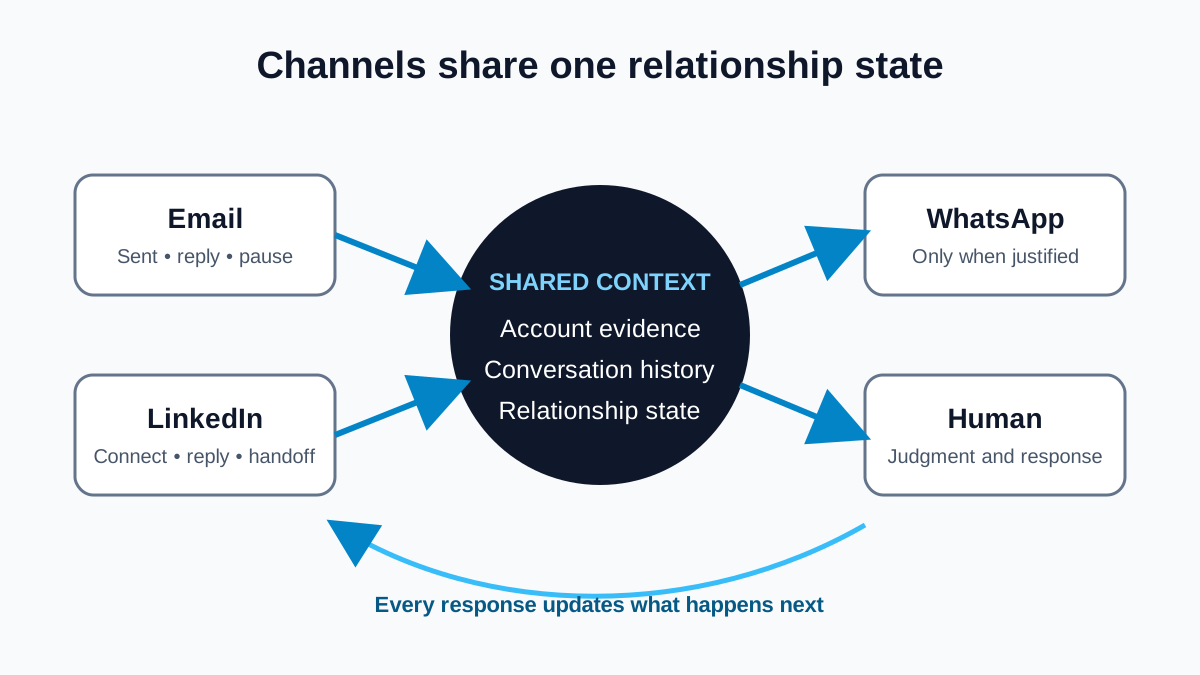
Most multi-channel outbound is just multi-tab spam. A team launches an email sequence, creates a separate LinkedIn routine, and adds WhatsApp because the phone number exists. Each channel behaves as though it is the only conversation. The buyer experiences repetition, while the seller experiences three incomplete histories.
The cure is not a more elaborate cadence. It is shared relationship state: why the account was selected, what has already been said, what the person replied, which permissions and preferences apply, who owns the next action, and when the workflow must stop. Channels are delivery surfaces. The relationship is the unit of coordination.
Short answer
To coordinate email, LinkedIn, and WhatsApp without sounding generic, maintain one shared account and conversation record. Ground each proposed touch in verified context, record what happened across channels, pause conflicting follow-ups after a reply, and require a legitimate, policy-compliant route for every channel. WhatsApp requires recipient opt-in under its business messaging policy, and LinkedIn restricts unauthorized automation, so “multi-channel” cannot mean “automate everything everywhere.”
Multi-channel, cross-channel, and shared context
Multi-channel only means that a team uses more than one channel. Cross-channel coordination means an event in one channel changes behavior in another. Shared context is the memory that makes that coordination possible: account evidence, contact identity, message history, permissions, replies, meeting notes, ownership, and open commitments.
Personalization without that memory is still generic. Company name, job title, and a scraped sentence may alter the surface of a message, but they do not prevent the next channel from repeating the same pitch after the buyer answered it. A useful system distinguishes four kinds of memory:
- Account memory: why the company surfaced and which evidence has been verified.
- Channel memory: what was drafted, sent, received, or stopped on each permitted channel.
- Conversation memory: the buyer’s question, objection, preference, correction, or lack of fit.
- Commitment memory: what the team promised, who owns it, and when it is due.
A reply-aware workflow in seven steps
- Choose the account before the channel. Verify fit, timing evidence, and an appropriate reason to engage. Do not use another channel to compensate for a weak account thesis.
- Resolve identity carefully. Make sure the email address, LinkedIn profile, phone number, and CRM contact actually represent the same person. An uncertain match should be reviewed, not merged automatically.
- Record permissions and exclusions. Store opt-ins, opt-outs, do-not-contact instructions, platform constraints, and team policies as hard workflow conditions.
- Select the smallest appropriate first action. Use the channel that fits the existing relationship and available permission. A thoughtful email may be enough. More channels do not make weak outreach stronger.
- Write channel-native drafts from one thesis. Preserve the same verified reason for contact while adapting length and form. Do not copy an email into a LinkedIn message or manufacture familiarity for WhatsApp.
- Change state on meaningful activity. A reply, opt-out, meeting booking, correction, or human takeover should pause conflicting actions and route the full history to the owner.
- Close the loop. Update the CRM/account record with the outcome and next action. If the account is disqualified or the person asks to stop, that state must survive future list imports.
An illustrative coordinated sequence
Imagine a fictional infrastructure software founder who verifies a public hiring signal at a target account. The founder sends one relevant email. Two days later, the contact accepts a LinkedIn connection but does not message. Shared context prevents the team from interpreting the acceptance as purchase intent; it can simply record the relationship event and wait for the planned next review.
The contact then replies by email: “We are not evaluating this quarter, but send the technical guide.” That reply should cancel any generic LinkedIn follow-up. The unified record should show the request, draft the smallest useful response, and create a future review date only if appropriate. The team should not move to WhatsApp because it has a mobile number. Without the recipient’s required opt-in, WhatsApp is not an available follow-up route.
Channel rules are product requirements
Channel orchestration has to respect the channel itself. LinkedIn’s official guidance on prohibited software and extensions says it does not permit third-party tools that scrape or automate activity on its website in the prohibited ways described there. Teams should use supported workflows and authentic human activity rather than treating a browser session as an automation endpoint.
The WhatsApp Business Messaging Policy says businesses may contact people on WhatsApp only after receiving their mobile number and opt-in permission, must honor requests to stop, and must not deceive or surprise people. In the United States, commercial email must also follow requirements summarized in the FTC’s CAN-SPAM guide. Other places may impose different or additional requirements. This is practical workflow guidance, not legal advice.
Common orchestration failures
- Channel escalation: moving from email to LinkedIn to WhatsApp because silence is treated as a technical failure.
- False continuity: writing “following up on our conversation” when no conversation happened.
- Reply lag: allowing scheduled touches to continue because one inbox did not update the campaign state.
- Identity collision: joining activity from two people with similar names into one record.
- Preference amnesia: losing an opt-out or negative reply when a contact re-enters through another data source.
How Gwenth applies this
Gwenth can keep available signal, account, and relationship context together across email, LinkedIn, and WhatsApp workflow context, with unified inbox and reply handling, CRM/account records, meeting context, and next-action support. The exact actions depend on connected sources, configured workflows, user approvals, channel capabilities, and valid permissions.
That means an email reply can inform the owner before another action is chosen, a LinkedIn interaction can be recorded without being inflated into intent, and WhatsApp context can be used only where the required permission and policy-compliant route exist. Gwenth does not promise platform access, consent, deliverability, or autonomous coordination. People remain responsible for identity, evidence, approvals, policies, and stopping.
Read next: see how shared context belongs inside the broader AI sales execution platform, then use the event follow-up playbook for a permission-aware channel workflow.
Tags
References
Source material used for factual context in this article.
- Prohibited Software and Extensions
LinkedIn Help · Accessed
Supports the limitation that third-party tools must not scrape or automate LinkedIn activity in ways prohibited by LinkedIn’s rules.
- WhatsApp Business Messaging Policy
WhatsApp · Accessed
Supports the requirement for recipient opt-in, honest business identity, respected opt-outs, and clear human escalation in applicable WhatsApp workflows.
- CAN-SPAM Act: A Compliance Guide for Business
Federal Trade Commission · Accessed
Supports the article’s U.S. commercial-email guardrails and the need to retain accurate sender information and honor opt-out requests.