Reader question
How do I find the right decision-maker at a B2B company?
Map the business problem to the person who owns it, distinguish that owner from budget and approval roles, and verify identity before treating a job title as buying authority.
How to Find the Right Decision-Maker for B2B Sales
Find a relevant buying role, verify the person and company, and document why the contact belongs in your account plan instead of defaulting to the CEO.
Scroll horizontally to inspect the diagram.
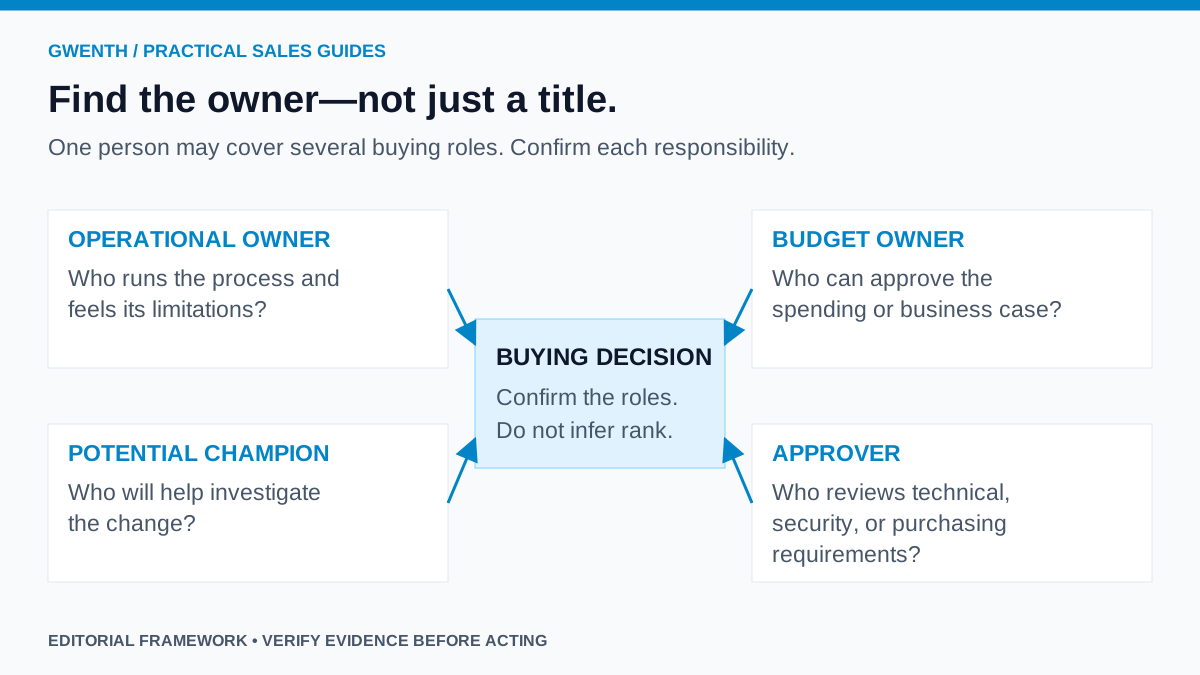
You have found a company that fits. The next temptation is to search for its CEO, find an email address, and declare the account ready. But the most senior person is not automatically the most relevant person for the problem you solve.
Short answer
Find the right B2B decision-maker by starting with the business problem, identifying the function that owns it, and researching people whose current responsibilities match. Distinguish the operational owner, potential champion, budget owner, and approver. Verify the person's employer and scope, record your evidence, and ask a specific ownership question when authority is uncertain.
Start with the problem, not a title list
Describe what changes after your product or service is adopted. Is someone trying to fill technical vacancies, coordinate outbound sales, improve finance reporting, or evaluate infrastructure? The owner of that work is a more useful research starting point than a generic list of founders and directors.
Titles become useful after that choice. For an engineering-recruitment offer, talent acquisition might own the process while an engineering leader owns the hiring requirement. For sales workflow software, sales leadership or revenue operations may own implementation. These are examples of roles to investigate, not universal organizational rules.
Map four buying roles
| Role | What to establish | Useful discovery question |
|---|---|---|
| Operational owner | Who runs the process and experiences its limitations? | Who owns this workflow today? |
| Potential champion | Who sees enough value to help investigate the change? | Who else would need to see this working? |
| Budget owner | Who can approve the spending or business case? | How would a project like this be funded? |
| Approver | Who evaluates technical, security, procurement, or legal requirements? | Which reviews would be needed before a pilot? |
One person may cover several roles in a small business. A larger account may have several people in each. Do not label a friendly contact a champion before they have demonstrated willingness to help. Do not mark budget authority as confirmed because a title contains “Head of”.
Use a three-pass research process
Pass one: identify the function
Read the company's own description, team pages, relevant vacancies, and announcements. Identify which team is connected to the observed change. A recruitment agency advertising a client's vacancy is not automatically the employer. A parent-company leader may not own the subsidiary's local purchasing decision.
Pass two: find plausible people
Search the company name together with the function and likely title variants. LinkedIn Sales Navigator documents account, title, and seniority filters, plus saved-lead alerts. Use those capabilities to narrow candidates rather than treating a filtered result as verified authority. Search snippets and third-party directories are discovery leads; open the underlying source when available.
Pass three: verify scope and recency
Check current employment, business unit, region, and relevant responsibility. Look for consistent evidence across the profile and company-controlled material. When sources disagree, preserve the disagreement and date the check. A previous job title should not silently become the title in a new outreach message.
Keep the exact profile URL and company domain. Two people with the same name, or two organizations with similar names, are not a match. Record an email as unknown when it is unknown. A guessed naming pattern should not be presented as a verified address.
A worked account example
Fictional, illustrative example: CedarWorks Software has advertised several engineering roles. You sell specialist recruitment support. A founder, a Head of People, and an Engineering Director all appear relevant, but for different reasons.
Your first hypothesis is that the Head of People coordinates hiring capacity. The Engineering Director may define the technical requirement and evaluate candidates. The founder may control budget in this small company, but you do not know that yet. Your account record should say “budget owner unconfirmed”, not “CEO is decision-maker”.
A first message can make the uncertainty explicit: “I saw the backend engineering openings on your careers page. Do you own external recruiting support for those roles, or is that handled by the engineering team?” This asks about a real responsibility and gives the recipient a simple routing answer.
If the recipient redirects you, record who referred you and what permission was actually given. Do not invent an introduction, imply an endorsement, or claim to have worked together before.
Keep more than one contact without creating a blast list
LinkedIn's Relationship Map is one documented way to visualize stakeholders and track changes. A small team can start with the same discipline in a CRM: person, proposed role, evidence, confidence, last interaction, and next question.
Having several relevant contacts does not mean contacting all of them at once. Choose a primary route and record why. Coordinate any additional outreach around distinct responsibilities and existing conversation context. When someone says the project is not relevant, do not bypass that answer by repeatedly messaging their colleagues.
Make the CRM explain the contact
Use a note that survives a handoff: “Possible owner of recruiting support because current role covers talent acquisition; company advertises three relevant vacancies; budget authority unconfirmed; ask about ownership.” That is more useful than an unexplained contact score.
HubSpot documents how activities associate with contacts, companies, and deals, including exceptions. The evaluation lesson is to check where a conversation is actually stored. A note on a contact does not automatically mean every relevant company or opportunity record contains the same history.
How Gwenth applies this
Gwenth can keep available company, contact, signal, and reply context close to the next sales action. Evaluate it with one real account: can a seller explain why each person is relevant, correct an outdated contact, and preserve the conversation for a teammate? Exact enrichment coverage and workflow behaviour depend on sources and configuration.
Gwenth should be considered for connected sales execution, not as proof that every suggested person controls budget. Use the CRM evaluation checklist to test record accuracy and handoff behaviour before scaling the process.
Questions that come up in practice
Should I always contact the founder at a small company?
No. The founder may own the decision, but another person may understand the workflow better. Start with responsibility and confirm the route.
What should I do when nobody clearly owns the problem?
Ask a narrow ownership question through an appropriate business contact route. Keep the account in research rather than manufacturing certainty from a title.
Editorial note: AI assisted drafting and graphics. Role assignments and the fictional example are proposed research practices, not verified authority at a real company or evidence of sales outcomes.
Tags
References
Source material used for factual context in this article.
- How to Use LinkedIn Sales Navigator
LinkedIn · Accessed
Documents lead and account filters, saved leads, and job-change alerts. Filters narrow research; they do not independently establish purchasing authority.
- Meet Relationship Map
LinkedIn · Accessed
Describes mapping and sharing buying-committee relationships. Used for the product capability, not vendor-reported performance claims.
- Associate activities with records
HubSpot · Accessed
Documents contact, company, deal, and activity associations and their exceptions; supports checking how relationship history is connected.